Merge fields
Why this matters
A message with the person’s name, date or amount in it is clearer and gets more replies than a generic one. Merge fields do this for every row in one send.
How they work
A merge field is a column header between double carets: ^^ColumnHeader^^. For each row, ExcelSend swaps the field for that row’s value in the column.
With a sheet like this:
| first | petName | date | time |
|---|---|---|---|
| Jack | Rex | 14/10/2026 | 10:30 |
the message
Hi ^^first^^, a reminder that ^^petName^^ is booked in on ^^date^^ at ^^time^^. Please reply YES to confirm.
is sent to Jack as
Hi Jack, a reminder that Rex is booked in on 14/10/2026 at 10:30. Please reply YES to confirm.
Add a merge field
- In Text Message, put the cursor where the value should go.
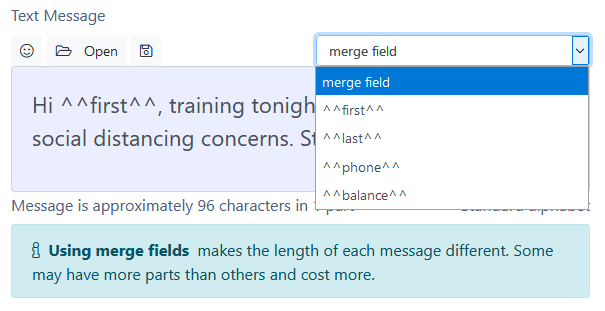
- Choose the column from the merge field list. ExcelSend inserts
^^ColumnHeader^^.
You can also type the field yourself. Header matching ignores capitals: ^^First^^ and ^^first^^ are the same.
Dates, times and amounts
ExcelSend merges the text shown in the cell, as Excel displays it. To change how a date or amount appears in the message, change the cell’s number format in Excel:
- A date cell formatted as
dd mmmmmerges as14 October. - An amount formatted as currency merges as
€12.50.
If you need a different format only in the message, add a helper column with Excel’s TEXT() function, for example =TEXT(C2,"dddd d mmmm"), and merge that column.
Format codes inside the field, such as ^^date{d:dd MMM}^^, belonged to the old ExcelSend desktop version. The add-in ignores them and merges the cell’s displayed text.
Special fields
| Field | What it does |
|---|---|
^^oo^^ | Inserts the 17-character opt-out link. Added for you by Add 17 character opt-out link; see Opt-outs. |
Common problems
“One or more of your messages contain unknown merge fields” A field doesn’t match any header in row 1, often because of a typo or a header with a trailing space. Unmatched fields show in red. Correct the field or the header and click Create Preview again.
A date merged as a number such as 46309 The cell holds a date but is formatted as a number or General. Format the column as a date in Excel.
Some messages cost more than others Merged values have different lengths, so some messages run into an extra part. Check the longest messages in the preview.