What ExcelSend does
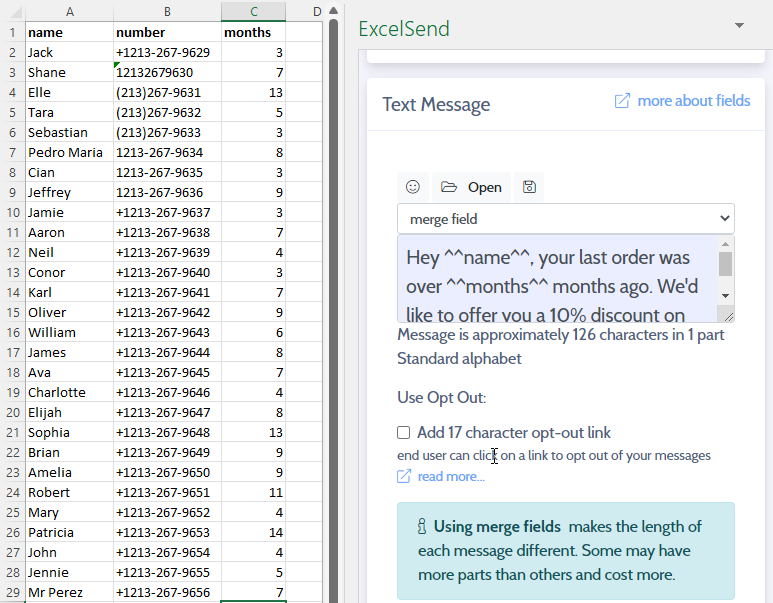
ExcelSend is an add-in for Microsoft 365 Excel. It turns the rows of a spreadsheet into SMS text messages, one per row, and writes what happened back into the same rows: whether each message was sent, its delivery status and any reply.
The problem it solves
A lot of contact lists already live in Excel: waiting lists, booking sheets, debtor lists, rosters. Texting them usually means exporting to another system, keeping two copies in step and copying the results back by hand. ExcelSend sends straight from the sheet, and the results land in it, so the spreadsheet stays the one record.
What it does
- Personalised messages. Any column can go into the message with a merge field such as
^^firstName^^. - Preview before sending. Every message is shown with its destination, size in parts and status, with the total price, before anything is sent. See Preview and send.
- Delivery data in line. Report columns record whether each message was sent, when, its status and any error.
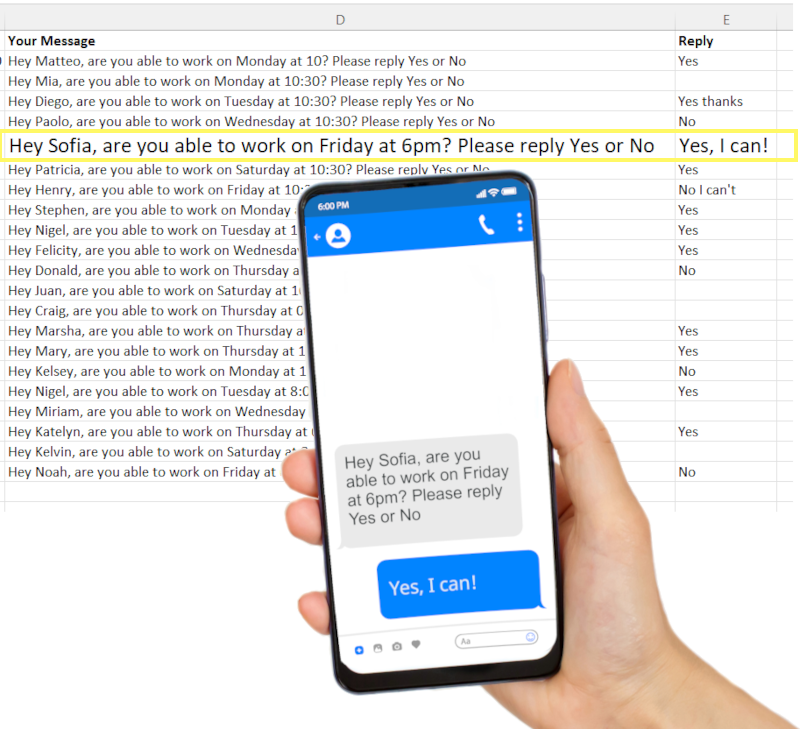
- Two-way messaging. Where your country allows it, contacts can reply and the replies come back to the row of the message they answered.
- Opt-outs. An optional 17-character opt-out link lets recipients stop further messages. Opted-out numbers are blocked on later sends.
- Branded Sender IDs. Where supported, messages can come from your organisation’s name instead of a number. See Replies and Sender IDs.
- Scheduling. Send now, or at a set date and time up to 14 days ahead.
Where it’s used
- Healthcare: validating waiting lists by asking patients whether they still need a procedure, and appointment reminders. See the waiting list example.
- Billing: notifying customers of bills due or balances outstanding.
- Small businesses: booking reminders with confirmation replies. See the appointment reminder example.
- Marketing and logistics: offers to opted-in customers, delivery and collection notices.
What adoption involves
- Microsoft 365 Excel, and permission to add add-ins (or an administrator to add it for you). See Install ExcelSend.
- An ExcelSend account. There’s no subscription: you pay per message part and per reply. See Pricing.
- Your account’s country decides whether replies and Sender IDs are available. Check where ExcelSend works first.
ExcelSend is provided by DiaryBook Limited, whose management system is certified to ISO 9001:2015. DiaryBook is registered with the UK Information Commissioner’s Office (ICO), registration number ZC254995 (certificate).